Business Card Mockups: A Practical Evaluation for Designers and Professionals
When presenting a business card design to a client, adding it to a portfolio, or preparing a print-ready proof, the way that design is displayed can significantly influence how it is received. A flat, uncontextualized layout file often fails to convey the tactile qualities, finish, and scale of a finished card. This is where Business Card Mockups enter the picture. These tools transform a two-dimensional design into a photo-realistic representation, placed within a real-world setting that mimics the final printed product. For anyone involved in brand identity work, graphic design, or print preparation, understanding what these mockups offer—and where they fall short—is essential to making an informed choice.
This article evaluates a specific set of mockups that includes three distinct styles, all built around smart object functionality and high-resolution output. Rather than simply describing the features, the goal here is to help you assess whether such a resource aligns with your workflow, your presentation needs, and your budget. We will explore the practical benefits, the tradeoffs inherent in using pre-built mockups, the situations where this type of product excels, and the scenarios where alternative approaches might serve you better.
What This Business Card Mockup Set Offers
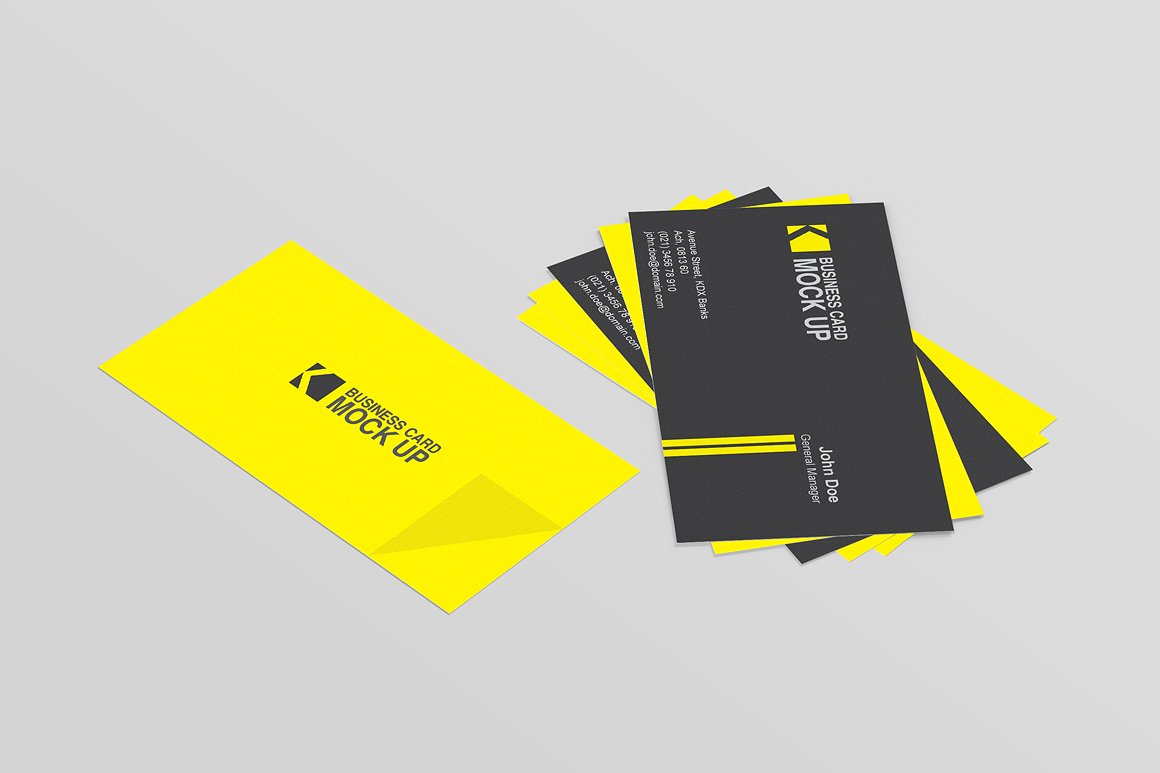
At its core, this collection provides three PSD files, each presenting a different photographic style for displaying a business card. Every file uses a smart object layer, which allows you to insert your design and see it rendered within the scene automatically. The card size is set to 9x5 cm, a standard business card dimension, and the overall canvas is 3000x2000 pixels at high resolution. The mockups also incorporate depth of field effects, meaning parts of the scene are subtly blurred to draw attention to the card itself.
Background customization is handled through a dedicated smart object, and you have the option to adjust the background color or apply a fabric texture. A clean, neutral background is also available if you prefer a more minimal presentation. An instructional help file is included to guide you through the replacement process. These details matter because they directly affect how much control you have over the final look and how quickly you can produce a polished result.
Why Designers and Clients Value Photo-Realistic Mockups
The primary reason professionals turn to Business Card Mockups is the gap between a digital layout and a physical product. A business card is a small, tactile object. Its weight, finish, and presence are difficult to communicate through a flat PDF alone. By placing your design into a photo-realistic scene—perhaps on a desk surface, held in a hand, or stacked with other cards—you give the viewer a much clearer sense of how the card will look and feel in everyday use.
For client presentations, this can reduce the number of revision cycles. Clients often struggle to visualize how a design will translate to print. A realistic mockup bridges that gap, making it easier for them to approve a design or request specific changes before the job goes to press. For portfolio use, a well-composed mockup elevates the overall presentation, showing that you understand both the design and the context in which it will be used.
The smart object feature is particularly valuable because it eliminates the need to manually composite your design into each scene. You open the PSD, double-click the smart object layer, paste your artwork, save, and the mockup updates automatically. This workflow saves time, especially when you are presenting multiple card variations or iterating on a single design.
Benefits of This Specific Mockup Set
Having three distinct styles within one package gives you flexibility without requiring you to purchase multiple products. You can choose the setting that best matches the tone of the brand you are presenting. A more formal brand might suit a clean, minimal background, while a creative agency might prefer a fabric-textured surface that adds warmth.
The high resolution (3000x2000 px) ensures that the output is suitable for both screen display and print proofs. You can zoom in on details without encountering pixelation, which is important when presenting to clients who may want to inspect the design closely. Depth of field effects add a professional polish that mimics real photography, drawing the eye naturally to the card.
Customizable background options, including the ability to change color or apply a fabric texture, mean you are not locked into a single look. This is especially useful if you are presenting multiple card designs to the same client and want each mockup to feel distinct while maintaining a consistent style. The inclusion of a clean background option also ensures that you have a fallback for more conservative presentations.
The help file is a small but practical inclusion. While smart object workflows are straightforward once you have used them a few times, a clear guide reduces the learning curve for those who are new to PSD mockups. This lowers the risk of mistakes during the design replacement process.
Tradeoffs and Considerations
No pre-built mockup set is without limitations, and understanding these tradeoffs is critical to deciding whether this product is the right fit for you. One of the most common constraints is that the scene, lighting, and perspective are fixed. While you can customize the background color and texture, you cannot change the angle of the card, the lighting direction, or the props in the scene. If your client has a very specific visual in mind—say, a card photographed on a marble table with a coffee cup in the background—a generic mockup may not match that vision.
Another consideration is the card size. These mockups are designed for a 9x5 cm card. If you are working with a non-standard size, such as a square card or a larger folded card, the mockup will not accommodate it without significant manual adjustment. You would need to transform the smart object contents or find a different mockup that matches your dimensions.
The depth of field effect, while visually appealing, can sometimes obscure important details at the edges of the card if the blur overlaps with the design area. This is a stylistic choice that works well for some presentations but may frustrate you if the client wants to see every element of the card with absolute clarity. In such cases, a flat mockup or a fully in-focus photograph might be preferable.
Finally, because these are PSD files, you need access to Adobe Photoshop or a compatible application that supports smart objects. If you work primarily in other design tools, you may need to adapt your workflow or look for mockups offered in alternative formats.
When This Mockup Set Is a Strong Fit
This set is particularly well suited for designers and agencies who regularly present business card concepts to clients and need a quick, reliable way to produce professional-looking visuals. If you value speed and consistency, and you are comfortable working within the constraints of a pre-built scene, these mockups will serve you well.
It is also a strong choice for individuals building a portfolio, whether online or in print. The photo-realistic quality helps your work stand out, and the variety of three scenes gives you enough range to showcase different projects without repetition. The high resolution ensures that your portfolio images look crisp on retina displays and in print.
For those new to using mockups, the smart object workflow and included help file make this an accessible entry point. You can achieve results that look like they were professionally photographed without needing to set up a studio, rent equipment, or learn advanced compositing techniques.
If your typical client projects involve standard-sized business cards and you are looking for a polished, consistent presentation style across multiple projects, this set offers good value for the investment.
When Alternatives May Be Worth Considering
If your work frequently involves non-standard card sizes or if you need full control over every element of the scene—lighting, props, angle, depth of field—a pre-built mockup set may feel restrictive. In those situations, you might be better served by creating your own photographic mockups or using a 3D rendering tool that allows you to build scenes from scratch. This approach requires more time and skill but offers unlimited flexibility.
Another alternative is to use online mockup generators or services that allow you to upload your design and generate a realistic preview without needing Photoshop. These tools are often browser-based and can be faster for one-off projects, but they typically offer less customization and lower resolution than a dedicated PSD set.
Some designers prefer to use vector-based mockup templates in tools like Illustrator or Affinity Designer. If you do not have access to Photoshop, or if you prefer to stay within a vector workflow, those alternatives may be more practical. However, they rarely achieve the same level of photo-realism as a well-crafted PSD mockup due to the limitations of vector rendering for lighting and texture.
If budget is a primary concern, free mockup resources are available online. However, they often come with restrictions on commercial use, lower resolution, or limited style options. Paid sets like this one typically offer higher quality, clearer licensing, and more reliable support.
Decision-Making Insights
To determine whether this Business Card Mockups set aligns with your goals, start by assessing your typical project requirements. If you design business cards on a regular basis and need a presentation method that is both professional and efficient, this product offers a practical balance of quality and convenience. The three styles give you room to vary your presentations, and the smart object workflow minimizes repetitive tasks.
Consider the level of customization you realistically need. If your clients rarely request specific scene elements and are primarily concerned with the card design itself, the fixed scenes will not be a drawback. The ability to adjust the background color or fabric texture provides enough flexibility to differentiate presentations without overwhelming you with options.
Evaluate your technical environment. If you already use Photoshop and are comfortable with smart objects, you will be able to integrate these mockups into your workflow immediately. If you rely on other software, you may need to check whether the PSD format is compatible or look for alternative formats.
Think about the long-term value. A single mockup set can be reused across many projects, so the cost per use decreases significantly over time. If you only need a business card presentation once or twice, a free or low-cost alternative might suffice. But if you anticipate ongoing need, investing in a high-quality set with multiple styles and high resolution is a sound decision.
Finally, consider the impression you want to make on your clients. A photo-realistic mockup communicates attention to detail and professionalism. It signals that you understand how the final piece will function in the real world. For designers who want to differentiate themselves, that level of polish can be a meaningful advantage.
Final Reflections
Pre-built mockups are not a substitute for custom photography or 3D rendering, but they occupy a valuable middle ground. They deliver professional results quickly and consistently, which is why they have become a staple in the design industry. This particular set, with its three styles, smart object workflow, high resolution, and background customization options, addresses many of the common needs that designers face when presenting business card designs.
The most effective approach is to view mockups as a tool in your larger presentation strategy, not as a one-size-fits-all solution. When the constraints of a pre-built scene fit your project, the time savings and quality are undeniable. When they do not, you have the awareness to seek out alternatives. That balanced perspective will serve you well as you evaluate options and make decisions that best support your work and your clients.
By understanding both the capabilities and the limitations of Business Card Mockups, you can confidently choose when to use them and when to explore other methods, ensuring that every design you present is shown in its best possible light.