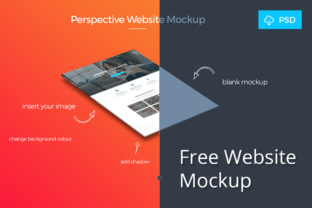
Free Website Mockup: A Practical Tool for Professional Web Design Presentation
When you are working on a website project, the gap between a raw concept and the final polished interface can sometimes feel like a canyon. Clients need to see what the finished product will look like, but you may not have the time or resources to build a fully functional prototype. This is where a Free Website Mockup becomes an indispensable asset. These pre‑built, easy‑to‑use templates let you present your work in a realistic context, helping everyone involved visualize the end result without writing a single line of code. The Free Website Mockup from KL-Webmedia is one such resource, crafted by experts who know exactly how to make your designs stand out.
The core idea behind a website mockup is simple: you take your flat design and place it inside a device frame – a laptop, a desktop monitor, a tablet, or a mobile phone – to simulate how the website will appear in the real world. A good mockup does more than just display the design; it adds depth, context, and professionalism. Suddenly, a 2D image becomes a convincing preview of a live experience. This makes a Free Website Mockup an essential tool for designers, agencies, freelancers, and even business owners who need to communicate their vision clearly.
The Challenges of Presenting Website Designs
Anyone who has tried to sell a website design knows that explaining a layout with raw wireframes or static screenshots can be frustrating. Clients often struggle to “see” the final product when the design looks flat and disconnected from the environment where it will be used. Common obstacles include:
- Lack of visual context: A design on a white background may look sterile or unrealistic. It does not convey the scale, aspect ratio, or lighting of an actual screen.
- Communication gaps: Without a realistic presentation, clients may misinterpret elements like button sizes, spacing, or image placement. They might ask for changes that are unnecessary once they see the design “in action.”
- Time pressure: Building your own mockup scenes from scratch takes hours. You have to find high‑quality device images, align your design perfectly, and create shadows or reflections. This cuts into the time you could spend refining the actual design.
- First impressions matter: In a competitive freelance or agency market, your initial proposal needs to look polished. A dull presentation can make an otherwise strong design appear amateurish.
These pains are familiar to almost every web professional. The good news is that a well‑crafted Free Website Mockup eliminates these problems in one straightforward download.
How a Free Website Mockup Helps Solve These Problems
The Free Website Mockup template from KL-Webmedia is designed with the user’s workflow in mind. Because it is a PSD file, it works seamlessly with Adobe Photoshop, giving you full control over the layers. You simply place your design into the smart object layer, and the mockup automatically adjusts to the correct perspective, lighting, and shadowing. This means you can produce a high‑fidelity presentation in minutes, not hours.
By using this template, you immediately add a layer of professionalism to your portfolio, proposal, or client communication. The expert‑crafted lighting and reflections in the Free Website Mockup ensure that your design looks like it is running on a real device. This can be the difference between a client nodding politely and them being genuinely excited about the direction of the project. When a client sees their website mockup displayed in a realistic laptop frame, they can better understand the visual hierarchy, the use of whitespace, and the overall user experience.
Practical Applications and Real‑World Outcomes
The versatility of a Free Website Mockup extends across many scenarios. Here are some of the most valuable applications:
Client Presentations and Pitches
When you present a website concept to a client, you want to capture their imagination. Using a mockup to show the homepage, an interior page, or even a responsive layout across multiple devices helps the client “feel” the design. For example, a freelancer pitching a new e‑commerce site can use the Free Website Mockup to display product pages with realistic device framing. The client instantly understands the scale of product images and the placement of the Add to Cart button. This clarity often leads to faster approvals and fewer revision cycles.
Portfolio Showcases
If you are a designer looking for new projects, your portfolio must communicate your capabilities instantly. A flat screenshot might not grab attention, but a mockup that shows your work on a sleek laptop or monitor creates a strong visual impact. By incorporating the Free Website Mockup into your portfolio, you demonstrate attention to detail and a professional workflow. Agencies and hiring managers can see your design in a polished context, which can make your work stand out among dozens of other applicants.
Internal Team Collaboration
Even within an internal team, mockups help align different stakeholders. A developer might need to see how a design will look on a specific screen size. A marketing specialist might want to evaluate the placement of a call‑to‑action button. By using the same Free Website Mockup template, everyone can view the design with consistent framing. This reduces misunderstandings and speeds up the handoff between design and development.
Testing Layout Hypotheses
Sometimes you want to compare two design versions before committing to one. Instead of building two separate prototypes, you can apply both versions to the mockup and present them side by side. The Free Website Mockup acts as an equal canvas, making the comparison objective. You can easily see which version has better balance, clearer typography, or more effective use of color – all within a realistic viewing context.
How Different Users Approach the Mockup
Not everyone will use the Free Website Mockup in the same way, and that flexibility is one of its strengths. Here is how various users might leverage the template:
- Freelance Web Designers typically focus on building a strong personal brand. They can use the Free Website Mockup to create consistent, branded portfolio pieces that look curated and professional. They might also use it when sending initial proposals to potential clients via email or online communities.
- Agencies often need to produce multiple mockups for different clients quickly. The Free Website Mockup serves as a uniform template that can be used across projects, maintaining a consistent quality of presentation. An agency team may allocate one designer to set up the mockups, ensuring all client deliverables have the same polished finish.
- UI/UX Designers may use the mockup to test their designs in various device contexts. While they often work in wireframing tools, a polished mockup helps when communicating with non‑design team members. The Free Website Mockup can also be used in usability testing presentations to give stakeholders a realistic preview.
- Small Business Owners who are building their own website might find the Free Website Mockup useful when working with a freelance designer. They can quickly and easily see how the design will look on a typical laptop, making it easier to give feedback or approve the work. Even without Photoshop, they can ask their designer to use the template for all presentations.
Recommendations for Getting the Most Out of the Template
To really maximize the value of a Free Website Mockup, keep these practical tips in mind:
- Customize the background and reflections: While the default scene is professional, you may want to adjust the lighting or color to match your brand or the mood of the design. Simple tweaks can make the mockup feel more cohesive with your overall presentation.
- Use high‑resolution design images: The mockup supports high quality, so ensure your design is large enough and scaled properly. Always place a sharp, well‑exported image into the smart object to avoid pixelation.
- Combine multiple mockups for a story: For a more complete presentation, show the design on both a laptop and a mobile screen within the same mockup set. This communicates responsive thinking and provides a fuller picture to the client.
- Keep the file organized: Because the Free Website Mockup is a PSD with multiple layers, maintain good layer naming and structure. This is especially helpful if you plan to reuse the template frequently.
- Use mockups in proposals and pitch decks: Instead of attaching raw screenshots to a PDF, embed mockup images to enhance readability. A mockup can fill a whole slide, making your presentation more visual and engaging.
Useful Considerations Before Downloading
While the Free Website Mockup is easy to use, there are a few things to keep in mind. The template is a PSD file, so you will need Adobe Photoshop (or a compatible graphics editor) to edit the smart objects. If you do not own Photoshop, you can still open the file in some free alternatives, though you may lose some layer effects. Additionally, the mockup is designed for a specific device or scenario – likely a laptop or monitor frame – so it is ideal for desktop‑centric designs. If you need to present mobile‑first designs, you may want to combine this mockup with a mobile‑specific template.
The beauty of this particular Free Website Mockup is that it was built by the experts at KL-Webmedia, a team known for producing practical, high‑quality design resources. This means you can trust that the layers are well‑organized, the shadows are realistic, and the output will look clean. You are not wasting time fixing a low‑quality mockup – you are starting from a solid foundation.
Final Thoughts on Using a Free Website Mockup
Every web designer and agency professional needs a handful of reliable tools to present work effectively. A Free Website Mockup is one of those tools that can dramatically improve how your designs are perceived. It bridges the gap between a static image and a living interface, helping clients and stakeholders focus on what matters: the user experience. The template from KL-Webmedia is a perfect example of how a simple, well‑executed resource can save time and elevate your entire presentation workflow.
Whether you are pitching to a demanding client, building a portfolio that attracts high‑paying projects, or simply collaborating with your team, incorporating this mockup into your routine can yield tangible results. You will spend less time on presentation logistics and more time perfecting your design. That is the kind of efficiency that every creative professional appreciates. So, download the Free Website Mockup, open the PSD, drop in your design, and watch your work come to life in a whole new way.